Task 1 - Animation
- Mar 17, 2016
- 11 min read
Task 1 A
3D
The 3D is Three-Dimensional. The 3D has three different positions lines. The Three Dimensions is width, height and depth. They have different shapes like; cube, rectangular, pyramid, cylinder and other geometrical shapes.

References:
The text information = Maths is fun, 2013. Solid Geometry [Online] <http://www.mathsisfun.com/geometry/solid-geometry.html> [Accessed 18th February 2015]
The photo link = http://media.showmeapp.com/files/431649/pictures/thumbs/1456887/last_thumb1395043676.jpg
2D
The 2D is Two-Dimensional. The 2D has two dimensions by any shapes. The two dimensions is the width and height. In 2D there nothing have thickness. The 2D you make different shapes like, rectangle, square, triangle, circle and other shapes but all are flat.

References:
The text information = Maths is fun, 2013. Two-Dimensional [Online] <http://www.mathsisfun.com/definitions/two-dimensional.html> [Accessed 18th February 2015]
The photo link = http://2.bp.blogspot.com/-_yek8GIfV6s/UyGsV1i4WxI/AAAAAAAACwA/qch4_hQaKbc/s1600/2dshape_2d_shape.jpg
Time Lapse
Time Lapse is taken by sequence of photos. The first time lapse was invented from Dr. John Nash Ott (1909 – 2000) in 1927. The first that he filmed was the apple blossoms blooming during the night. The time lapse is basically is taken a photo for example, one per second. Then pick these photos for 25 frames per second and explore the nice effect.

References:
The text information = Basic information who is invent the first time lapse - Winnetka history society, 2016. Preserving the John Nash Ott Time-Lapse Collection [Online] <http://www.winnetkahistory.org/gazette/preserving-the-john-nash-ott-time-lapse-collection/> Accessed 22nd February in 2016
The photo link - http://www.slideshowblog.com/wp-content/uploads/2013/04/timelapse3a.jpg
Zoetrope
Zoetrope is an animation of toys / characters are rounding. The most favourite material to made zoetrope is paper or cardboard. The zoetrope was invented from England in 1934. It is a wheel rounding thought by characters make repetition movement and it is a wheel of life. The most important to make is the flicker that set up to 25 or 30 frames per second but it depend from the vision of the person that he considers. The setup of the camera need to same setting from set up of speed of the spin.

References:
The text information = Random Motion, 2011. Zoetropes [Online] <http://www.randommotion.com/html/zoe.html> Accessed 22nd February in 2016
The photo link - http://www.cutoutfoldup.com/images/1108-i.jpg
Stop Motion
The first stop motion animation is created from J. Stuart Blackton and Albert E. Smith in 1897 and form a toy circus of acrobats and animals.

The material of the characters shall be to use clay because you can arrange the position of the characters. Stop motion is basically a story on a photo that can move the character or object. As you move the character or make the object move with many photos and they setup photos one each other to created story, compressed photos at 25/30 frames per second and you can watch objects move alone.

References:
The text information = A Brief History, 2014. Animation [Blog] <http://sophiesanimation.blogspot.com.mt/2014/12/research-1-brief-history.html> Accessed 29th February in 2016
Cel Animation
Cel animation is making by transparent paper that can draw the scene for per character by for layers by different position of scene per frame. Before to make the characters you need to draw on a white paper. First cel animation was invented from Disney Company back in 1959 by film Sleepy Beauty. This cel animation you need a lot of patient to make it.


References:
The text information = Slide Share, 2010. Cel Animation [Online] < http://www.slideshare.net/hsp7/animation-summary> [Accessed 18th February 2015]
The photo of link Sleepy Beauty http://ecx.images-amazon.com/images/I/51o5iMLx0WL._SY300_.jpg=
The photo of the layers = http://www.robotspacebrain.com/wp-content/uploads/2014/03/celllayers.gif
12 Principles of Animation
1 Squash & Stretch:
The Squash and Stretch is typically the gravity of earth. This technique is emphasizes in speed, momentum, weight and mass. If you have two balls; one is soft and other is solid. The soft ball is have more probability to bounce more, while the solid ball the probability to bounce very little. If you do an animation of soft ball and falls to the ground, the reaction mast be first squash horizontally and then stretch vertically and bounce it. When a person shows their emotions you need to make exaggerate facial expressions which may be boredom, stress, grief, joy, harvested and others. During the animation the face want to be stretches up. If the cube falls down in the ground you create impact. For animation first the cube goes flat horizontally and after vertically. This reaction depends how the speed is strong.

References:
The photo link = https://www.animdesk.com/wp-content/uploads/squetch_ball.jpg
2 Anticipation:
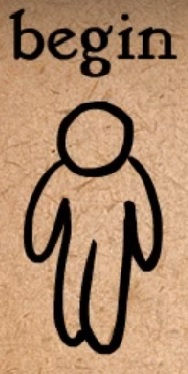


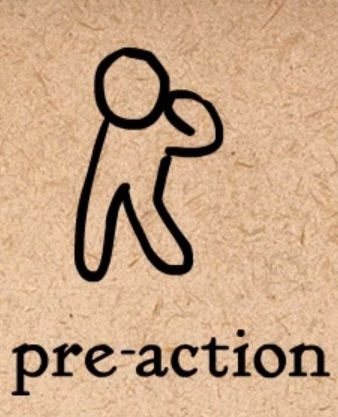

The Anticipation is before jumping you need energy to as much as possible to rise above is to drop owl and raised a large strength.
If you punch the elbow to be a little behind to get more strength. If creating this animation of punching the object it could not fall closely but just go away and be realistic.
This animation of anticipation prepares the audience the movement preparation before actual action.
The most important is when an object put on any position the face has look exactly for the object. If wouldn’t the face looking on the object the animation is wrong.
Reference:
Snapshot link - https://www.youtube.com/watch?v=F8OtE60T8yU&index=2&list=PL-bOh8btec4CXd2ya1NmSKpi92U_l6ZJd
3 Staging:
The standing is acting, timing, camera setting and position and settings. Where the audience view the animation is important which is focusing that you make.
Example;
The person walk normally, happy and observing the environment. There are people and making a baggy joke; like banana by throwing on the road or pavement. This good person not notice that the banana was on the road and he slipping. Then this person view people laughing and he was nervous and depressed. Soddenly he thank that those people made this joke. For animation first focus the on this person walk, second focus the banana, third this person is slipping and last the group of people is laughing.

They have two things that you remember on filming animation is close up and long shot. From long shot is good for big actions and close up is good for expressions.
References:
Snapshot link - https://www.youtube.com/watch?v=u-SXLaQGg50&list=PL-bOh8btec4CXd2ya1NmSKpi92U_l6ZJd&index=3
4 Straight Ahead & Pose to Pose:
They have two methods of straight ahead and pose to pose.
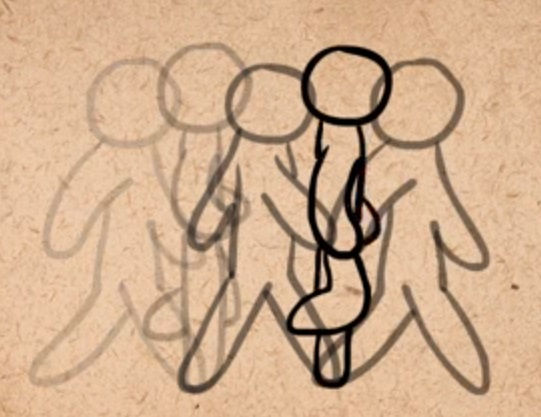
First method of straight ahead is to draw a person moving from frame one, then draw the same parson from frame but the hands and the legs made very little movement and completing to make this movement frame other frame.

Second method is Pose to pose that to draw a character moving from frame one and other on frame five by different action. If need more details draw the character in the middle (frame three) and other from frame four and five if necessary.
If you draw the character on many frames in one second the action shows very slowly while draw the character on few frames the action goes faster.
References:
Snapshots link - https://www.youtube.com/watch?v=v8quCbt4C-c&index=4&list=PL-bOh8btec4CXd2ya1NmSKpi92U_l6ZJd
5 Follow Through & Overlapping Action:
Basically when you have a tall object like; antenna of radio. For example when the person run on the left direction with antenna, the antenna begins to fold. The direction of antenna fold on the right. When the person stops sharply the antenna turn the direction on the left and the antenna begins shaky till to be standing again.

This is small explanation about this principle and it is divided by three is Follow Through, Overlapping Action and Drag it is the same but some different. This images is the face of the person animation when turn down the antenna are shaking.
For example arms, if make a movement first turn up the elbow, secondary the turn down for arm to the hands.

Last example is when has nice plant and the pot accelerates the speed the plant fold it named appendage.
Refecences:
Snapshots link - https://www.youtube.com/watch?v=4OxphYV8W3E&list=PL-bOh8btec4CXd2ya1NmSKpi92U_l6ZJd&index=5
6 Slow In & Slow Out:

Slow in and slow out is speed of the character of animation. When making the face of the person in the first piece slowly you need to draw many drawings of per frame, than in the middle reduce of amount of drawings to show the acceleration speed.

This is the evidence how increase or reduce the speed from motion.
References:
Snapshots link - https://www.youtube.com/watch?v=fQBFsTqbKhY&index=6&list=PL-bOh8btec4CXd2ya1NmSKpi92U_l6ZJd
7 Arcs:
Arcs can be added almost any figure movement.

This image is showing a circle throwing from left to right. From upper shows many circles adjacent because it is showing the reality of the gravity of earth. When throw a ball the speed is increasing till slowing and then re-increasing till falls to the ground.

Example; If making this animation to push down the handle of the door more realistic, you need put other handle in the middle of right angle.
References:
Snapshots link - https://www.youtube.com/watch?v=I1_tZ9LhJD4&index=7&list=PL-bOh8btec4CXd2ya1NmSKpi92U_l6ZJd
8 Secondary Action:
The primary action is the bite but all the secondary actions add more dimensions to the bite.
Example 1;

If create the man knocking the door by any emotion you need to make the second action. This image shows the person that is very angry and the elbow is right angle that is real character and is showing more realistic.
Example 2;

Another example is when parson is sad and create their tear downs from eyes. This is the best technique that show very good animation include by one hand remove the tear and looks for the object that the character was very depressed.
References:
Snapshots link - https://www.youtube.com/watch?v=MjBHWw1TbP4&index=8&list=PL-bOh8btec4CXd2ya1NmSKpi92U_l6ZJd
9 Timing:

Timing is the most important how to set up your animation. This image shows that the balloon plane have a lot of frames / drawings because the animation moves very slowly. While the plane have few frames / drawings and move very fast but it depends how to draw the amount of images of characters and objects. Sometimes some of animators are using two types of frames is PAL 25 fps and NTSC 30 fps and using those frames for making drawings for their animation.

Another reason is how to draw drawings of the character, because it can change the emotion and the story as well. This image show that from drawing one have situation, two drawings have other situation and complete to increase the amount of drawings and change totally the character.
References:
Snapshots link - https://www.youtube.com/watch?v=BarOk2p38LQ&list=PL-bOh8btec4CXd2ya1NmSKpi92U_l6ZJd&index=9
10 Exaggeration:
When you create an exaggerate animation character sometimes use the Squash & Stretch animation to make more realistic and. In fact this animation is showing that have five drawings by cat and crocodile. The crocodile biting the cat and in the middle drawing is the reaction of cat feel painful of biting from crocodile.
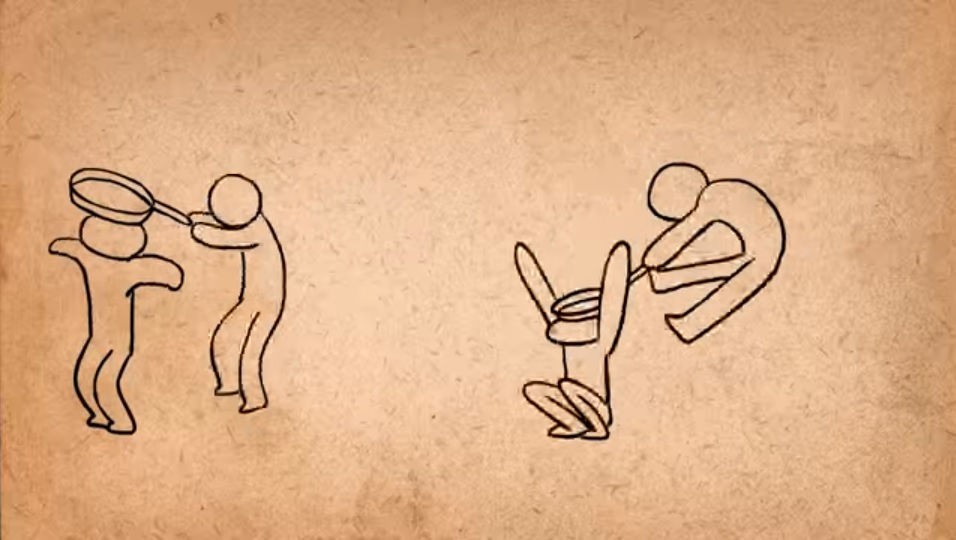
This two images shows two types of exaggeration. Which is real? Obviously the second picture, first the action is too aggressive because the person that putting a pan on a person's head is harsh and the action is more powerful.
References:
Snapshots link - https://www.youtube.com/watch?v=HfFj-VQKiAM&list=PL-bOh8btec4CXd2ya1NmSKpi92U_l6ZJd&index=10
11 Solid Drawing:
The solid drawing is based on volume, weight and balance. But the most important is how to make the character in the perspective.

This image is showing the character be away he is small while the character is close he is big.

When draw a character the basic shapes is circle is the red colour, the cylinder the green colour and cubes the blue colour. The other reason is if you decide how to make the character like 2D or 3D but it depends which animation you make. Those flat shapes or geometrical shapes helping you how to draw in detail of your character. For example if make the shoe the basic shape is cone.
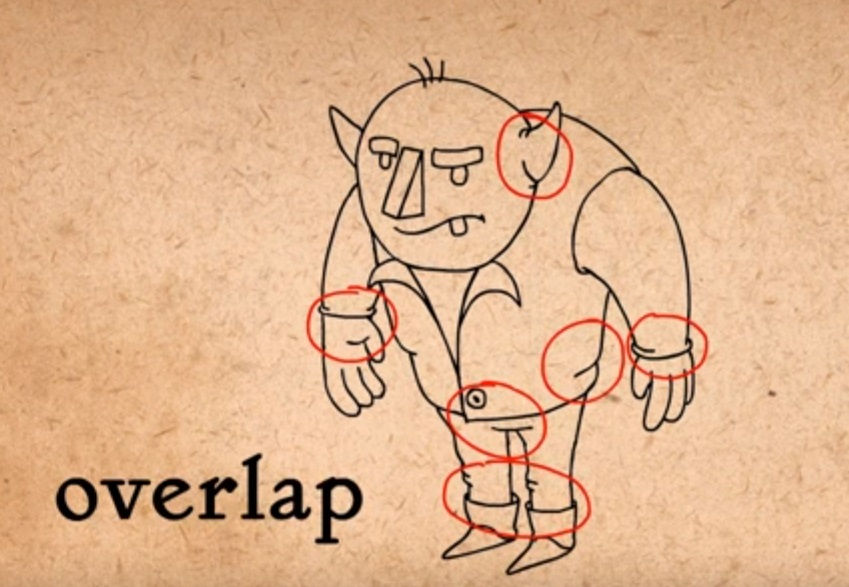
The overlapping shows the detail of the character makes more real and original.

Another reason is to focus on perspective. The basic is to make the match point on any direction in which you like, then spread the lines and form the cube. The second image of cube is very wrong and it is not realistic.
References:
Snapshots link - https://www.youtube.com/watch?v=7An0jukOkCI&list=PL-bOh8btec4CXd2ya1NmSKpi92U_l6ZJd&index=11
12 Appeal:
Appeal is divided by three is variety of shapes, proportions and keep it simple.
1. Variety of Shapes

This image shows that the characters more original and not all the same. The figurations of the characters much be better that the audience watch it for the animation.

This is the basic shapes before to fill the details of the characters.
2. Proportions

Proportion is how to create the characters more interesting. The audience appreciates more if for example the head is big, the legs is some big.

This image is more explained for example the senior people have more ages and the person’s spine is fold and use the stick. The children the head is bigger. The billionaires makes more serious.
3. Make it Simple

If make an animation of character and interesting and detailed it is impossible because the audience if look the character starts to confused which way to look. The second image is more simple and the eyes of the audience are set up and enjoying to watch the character.
References
Snapshots link - https://www.youtube.com/watch?v=_SplEuWp0Yw&list=PL-bOh8btec4CXd2ya1NmSKpi92U_l6ZJd&index=12
For this research I bring all of information from; YouTube, 2016. 12 Principles of Animation [Video Online] <https://www.youtube.com/playlist?list=PL-bOh8btec4CXd2ya1NmSKpi92U_l6ZJd> Accessed in 01 and 02 of March 2016
YouTube Channel – AlanBeckerTutorials
Worked by – Animators is Frank Thomas and Ollie Johnston
Task 1B
Colour Mode

My work
Screen Resolution
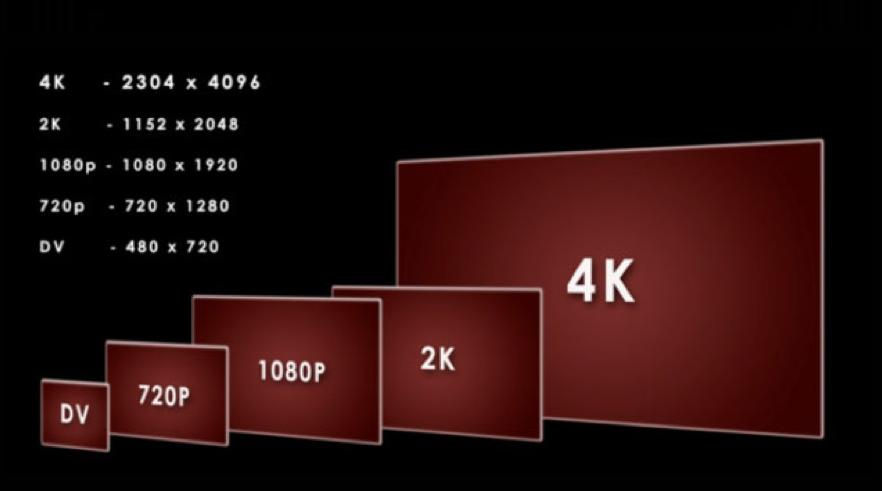
The number of the pixels of horizontal and vertical on a screen.
For Example;
Standard Definition is 720 x 576
High Definition is 1280 x 720
Full High Definition is 1920 x 1080 and other sizes of the screens.
If the screen resolution is complete to increase you need more pixels and more information to watch the scene more brilliant.
References:
The photo link = https://media.licdn.com/mpr/mpr/p/8/005/071/26d/0edc704.jpg
The text information = screen resolution Definition from PC Magazine Encyclopaedia, 2016. Pcmag.com <http://www.pcmag.com/encyclopedia/term/50918/screen-resolution> Accessed 29th February 2016
PPI – Pixels per Inch

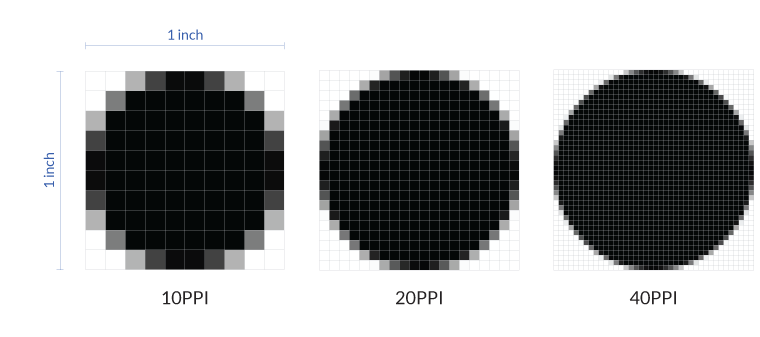
PPI is method how to measure the amount of pixels one line per inch on a camera. From digital camera you can setup the number of megapixels.
References
The text information = PPI, 2007. The Tech Terms Computer Dictionary [Online] <http://techterms.com/definition/ppi> Accessed 29th February 2016
The photo link = https://blog.oneplus.net/wp-content/uploads/2015/03/PPI.png
Megapixel

The megapixel is a million pixels of this unit and it is the size of the image of the digital camera. The pixel is the word invented from element picture. It is a basic unit to show the image of the computer and software. If have more pixels on camera is better to print best quality photo from printer. If the resolution of the digital camera is 1.3 megapixel is good quality size of 4 x 3 inch at 300 dpi (dot per inch) and it need higher quality camera with higher megapixel.
References
The photo link = http://www.vividlight.com/31/images/ImageSizes.jpg
Find a Tech Definition, September 2005. Megapixel [Online] <http://whatis.techtarget.com/definition/megapixel> [Accessed 18th February 2015]
FPS – Frames per Second
Frame is an image / photo. When we said frames per second is the amount of have photos for example 25 photos stored into a second. In America area use 30 frames per second and In Europe use 25 frames per second. Every frame is a movement that move very slow of each photo. Then pick some amount of photos and set up one after the other till 25 or 30 for one second and see the movement in reality.

References:
The Photo link - http://img11.deviantart.net/c6d7/i/2012/302/3/3/video___24_frames_per_second_pattern_by_hellrockheaven-d5jbraw.jpg
RGB Screen
RGB screen used the main three colours is Red, blue and Yellow. The measurement is from 0 till 255.

My work
This is my print screen from my PC. I used paint and I setup the main solid colour. When I put the curser down the number was 0 and it was representing the colour black and When I put the curser up the number was 255 and it was representing the colour White.

References:
The photo link = https://www.kirupa.com/images/rgb_image.png
4K
The 4k is referring UHD (Ultra-High Definition). 4K is a standard that include T.Vs, Monitors and other devices that have support horizontal resolution at least 400O pixels. The most common of 4K is Ultra HD that have capacity of the resolution of 3840 x 2160 pixels (3,840 pixels wide by 2,160 pixels tall). It is exactly twice of resolution of HDTV (1920 x 1080). 4K has proportion of the same aspect ratio of 16:9 of other resolutions.
The production started from 2013. Many companies now is offer the 4K TV screens like; Sony, Panasonic, Samsung, LG, Sharp, and other companies.

References:
The photo link = http://www8.pcmag.com/media/images/365098-hdmi-4k-comparison-ultra-hd.jpg?thumb=y
The text information = The Tech Terms Computer Dictionary, 2013. 4K [Online] <http://techterms.com/definition/4k> [Accessed 18th February 2015]
HDTV
HDTV is High Definition Television is a great quality video standard. The HDTV is use the aspect ratio of 16:9. This proportion is wider and the people see the Earth more realistic. This ratio is good to watch films and it can recorded by the same ratio. The tree types used by HDTV is 1080i (interlaced), and 720p and 1080p (progressive). HDTV is the digital signal.

References:
The photo link = http://www.geek.com/wp-content/uploads/2009/10/size.png
The text information = The Tech Terms Computer Dictionary, 2013. HDTV [Online] <http://techterms.com/definition/hdtv> [Accessed 18th February 2015]




Comments